

Numbers to decide, control to delegate
Twelve panels by subject: finance, inventory, and fine-grained access profiles for each team role.
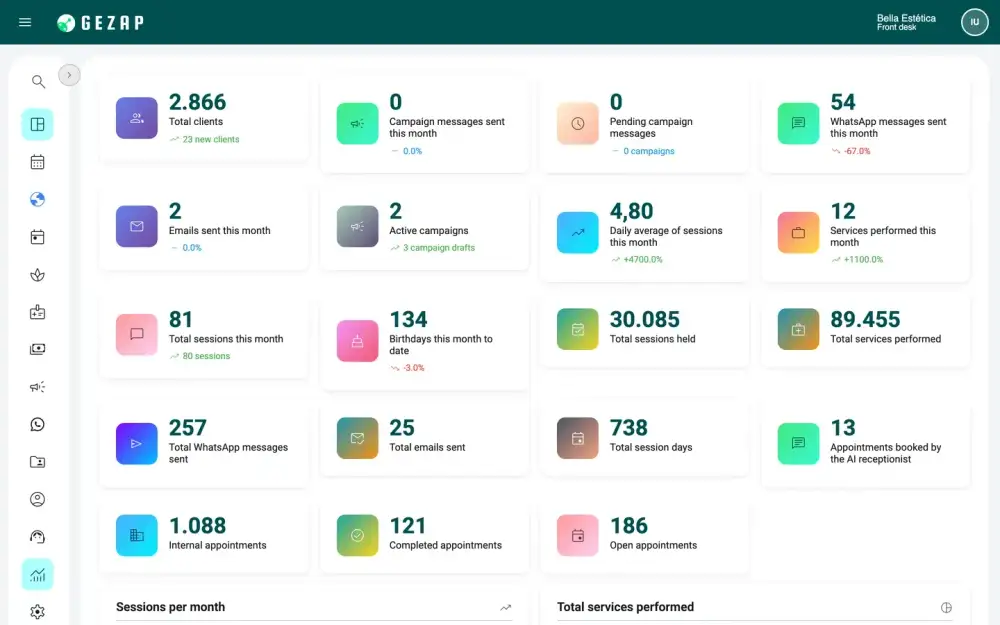
Twelve panels, one for each subject
Open the subject panel and see the number, without building a report. The panels are grouped into four sets: general, operations, relationships, and communication. The period, the comparison with the previous period, and the chosen professional carry over from one panel to the next, and every panel exports to CSV.
- Every number is clickable and opens the list behind it
- Each panel only appears to those with its permission, and the schedule, campaign, and AI receptionist panels follow your plan
- Screen search with Ctrl+K or Cmd+K, to go straight to what you need
General: the full year and today
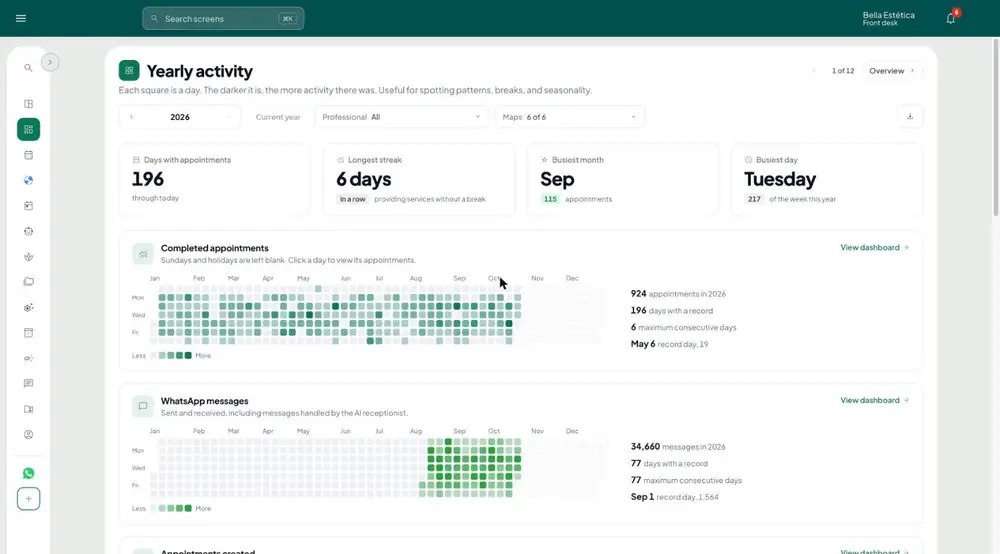
Two panels to open in the morning: what the year shows and what needs attention now.
- Yearly activity: a heat calendar by subject, where each square is one day (appointments, WhatsApp messages, created bookings, photos, birthdays, and new clients)
- In the same panel: days with appointments, longest streak, strongest month, and busiest day
- Overview: today's schedule with who has already been seen, who is in the waiting room, and who is still to come
- Bookings, attendance, completed appointments, and new clients, each with its change against the previous period
- Needs attention: birthdays today, campaign awaiting approval, clients without a visit for over 90 days, tomorrow's bookings not yet confirmed, and conversations waiting for a reply for over 2 hours
- Appointments by month against the previous year and where bookings come from
Operations: schedule, links, services, and photos
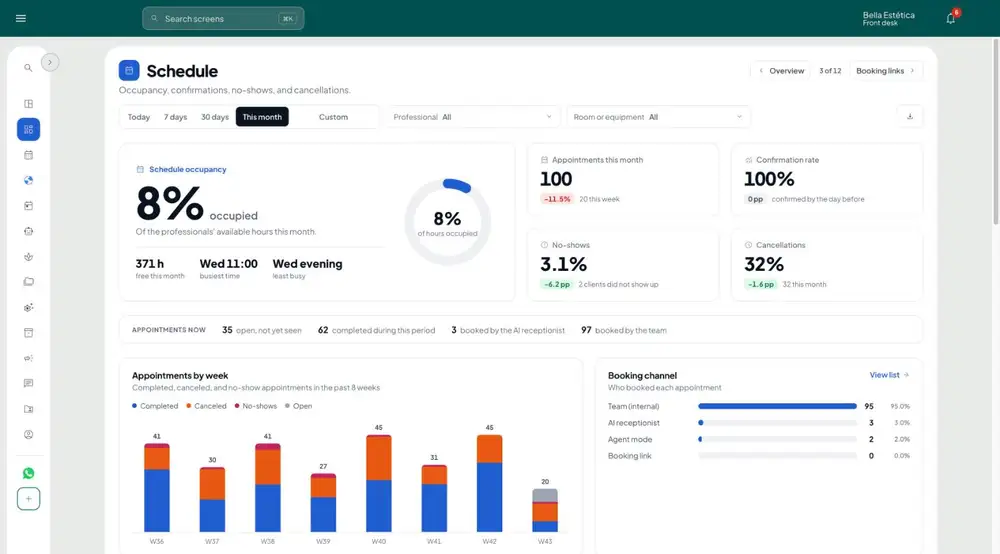
How much of the schedule is taken, what was done, by whom, and with what result.
- Schedule: occupancy, confirmation rate, no-shows and cancellations, with the day and time map and cancellation reasons
- Schedule: waiting list (queued, offer sent, accepted), average wait in the room, and tomorrow's bookings still unconfirmed
- Schedule: where each booking comes from: link, receptionist, team, or agent mode
- Booking links: pick a link and see requests, approval, slots used, and who attended
- Links: from request to appointment, most requested services and times, lead time and time to reply, with Approve and Decline right in the queue
- Visits and services: by month, by location, most performed services, by category and each professional's performance
- Photos and results: photo coverage in visits, recent before-and-after compilations, services with the most records and what is cleared for campaigns
Relationships: who comes back, who disappears, and who has a birthday
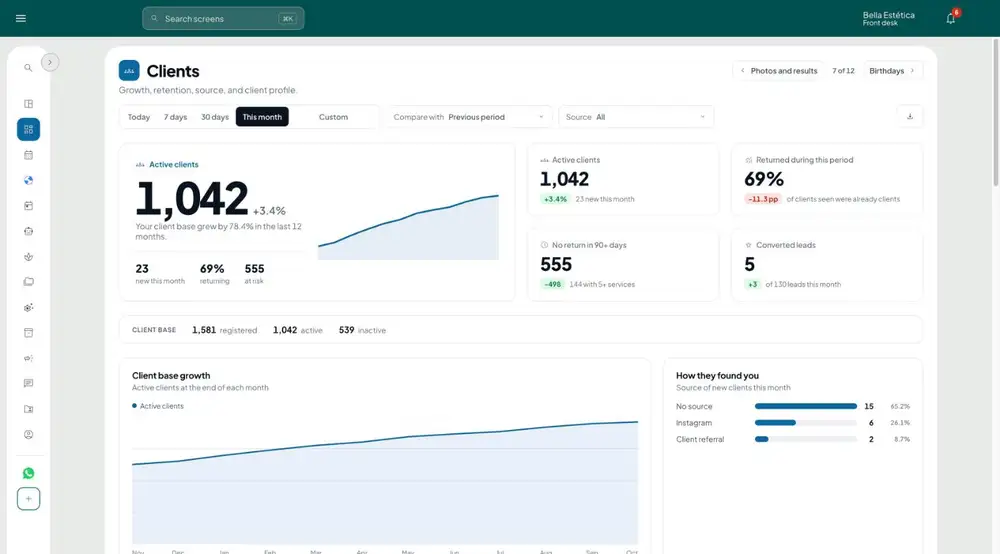
The client base read as it is: growth, source, return, and the dates worth a message.
- Clients: base growth, how they arrived, new and returning, gender, age range, and lead funnel
- Who refers the most, and clients at risk, without a visit for over 90 days, with a send-message button on each row
- Birthdays: the month calendar, the next 7 days with the status of the congratulations message, and how many came back within 30 days
- Returns: set how often each service repeats and see who is past due, from most overdue to most recent
- In Returns, call the client back from the table row and mark who has already been called or won't return
Communication: WhatsApp, campaigns and AI receptionist
What was sent, what arrived, who replied and how much the AI receptionist resolved on its own.
- WhatsApp: daily volume, read rate, first response time and who replied (team, receptionist or reminders)
- WhatsApp: status of each number, approved templates, delivery and read, and the queue of who is waiting for a team reply
- Campaigns and email: the funnel from scheduled to replied, why some were not sent and the best time to be read
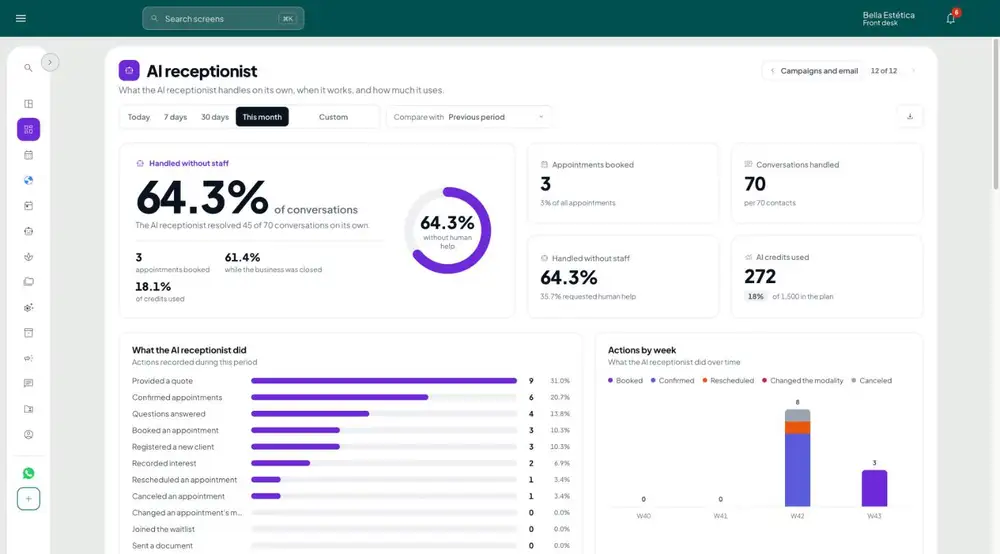
- AI receptionist: conversations resolved without the team, appointments booked, price requests and unanswered questions with no saved reply
- Receptionist: when it works, AI credits used in the cycle and conversations handed to the team, with the Reply button
Finance in the same system
From the day's cash to the month's result, with no spreadsheet alongside.
- Tab, cash register, accounts payable and receivable
- Pix copy-and-paste with your own business key
- Commission and tips per professional
- Recurring contracts and bank statement reconciliation (OFX)
- Income statement and cash flow
- Invoices issued by the business itself
Inventory checked during the session
Each product with batch, expiry date and location, and the stock deduction checked at the moment of service.
- Product ledger by product, batch and location
- Stock entry from the invoice XML
- Deduction checked during the session and cost per procedure
- Inconsistency alerts and shopping list
- Expired batches never leave the stock
Control you can delegate
Each team member with the access their role requires, and everything recorded.
- Custom access profiles, permission by screen and action
- Full audit trail of changes
- Multi-user according to your plan
- Quotes in PDF sent via WhatsApp or email
- System available in 13 languages
What’s coming next
- Coming soonService invoice issuance directly through GeZap
24/7
automatic WhatsApp service
13 languages
system, links and messages
7 days
free trial
0
lock-in: cancel anytime
Other features
AI Receptionist
AI that answers, books and speaks the client’s language.
Learn more →
Scheduling
Per-professional calendars and public links per language and timezone.
Learn more →
Campaigns
Bulk messaging with Meta-approved templates.
Learn more →
Official WhatsApp
Official WhatsApp, connected in 3 clicks.
Learn more →
Client record & Gallery
History, sessions, and photos with filters.
Learn more →
Session packages
Sell packages and let each client's balance follow the booking.
Learn more →
Client record
Everything about the client in one timeline, called Medical record in healthcare segments.
Learn more →
Progress protocol
Measurements, photos and charts to show the client's progress.
Learn more →
Anamnesis
Forms with your templates, filled in on a tablet and signed.
Learn more →
Clinical documents
Certificates, reports and referrals in PDF with the business logo.
Learn more →
Prescriptions
Paper prescription, retention and special control, with register book.
Learn more →
Quotes
Quote with client and services, as PDF, sent by WhatsApp and email.
Learn more →
The aesthetics journey
From first contact to return visits, everything in one system.
Learn more →
Multidisciplinary clinic
Several specialties, one schedule and one AI receptionist.
Learn more →
Start today. Free for 7 days.
Set up in minutes: connect your WhatsApp, upload your photos, launch your first campaign and put the rest on autopilot.
No credit card · no lock-in · cancel anytime · LGPD